Fingerprint unlock
The Best Fingerprint Smart Locks (2027)
Fingerprint smart locks for 2027: one-touch entry compared on speed, capacity, and backup methods.
The short answer
The Kwikset Halo Touch is the best fingerprint smart lock: fast reads, 100-print capacity, and keypad plus key backups. If anyone in the house gets inconsistent reads, prefer a keypad lock like the Yale Assure Lock 2.
Our top picks at a glance
- Kwikset Halo TouchFingerprint unlock with WiFi, at a mid-range price.Best fingerprint lock
- Schlage Encode PlusApple HomeKey plus WiFi, in a Grade 1 deadbolt.Best build, no fingerprint
- Yale Assure Lock 2The flexible keypad lock that fits every smart home.Best keypad alternative
- Ultraloq U-Bolt Pro WiFiSix ways in, including a fast fingerprint reader, at a mid-range price.Best fingerprint value
- SwitchBot Lock ProA retrofit lock that keeps your existing deadbolt and keys.Fingerprint via add-on keypad
- eufy Smart Lock C220A fingerprint deadbolt with self-learning AI recognition and built-in Wi-Fi.AI fingerprint with built-in Wi-Fi
What owners report
Synthesized from recurring themes in long-term owner feedback.
Most praised
- One touch entry with arms full of groceries is the moment fingerprint owners say sold them
- Enrolling a backup finger and a code means a single failed read never becomes a lockout
Common complaints
- Wet, cold, or worn fingertips still need a code or key backup on bad days
- Children and older relatives are the household members most likely to get inconsistent reads
The picks, ranked
Every product in this lineup was picked for this use case, ranked with our strongest choices first. If a product from the wider category does not genuinely fit this scenario, it is not listed here.
| # | Product | Award | Security grade | Unlock methods | Fingerprint capacity | Connectivity | Re-keying |
|---|---|---|---|---|---|---|---|
| 1 | Kwikset Halo Touch | Best fingerprint lock | ANSI/BHMA Grade 2 | Fingerprint, keypad, key, app | Up to 100 prints | Built-in WiFi | SmartKey Security cylinder |
| 2 | Schlage Encode Plus | Best build, no fingerprint | ANSI/BHMA Grade 1 | Apple HomeKey, keypad, key, app | - | Built-in WiFi, Bluetooth | - |
| 3 | Yale Assure Lock 2 | Best keypad alternative | ANSI/BHMA Grade 2 | Keypad, key, app | - | Bluetooth; WiFi via module | - |
| 4 | Ultraloq U-Bolt Pro WiFi | Best fingerprint value | - | - | - | - | - |
| 5 | SwitchBot Lock Pro | Fingerprint via add-on keypad | - | - | - | - | - |
| 6 | eufy Smart Lock C220 | AI fingerprint with built-in Wi-Fi | - | Fingerprint, app, keypad, key, watch, voice | - | Built-in Wi-Fi, no bridge | - |
Best fingerprint lock
Kwikset Halo Touch
Fingerprint unlock with WiFi, at a mid-range price.

Up to 100 fingerprints, roughly one-second unlock, and a keypad plus key as backups. Built-in WiFi keeps remote features working with no bridge. The complete fingerprint package at a mid-range price.
Strengths
- Fingerprint reader stores up to 100 prints and unlocks in about a second
- Built-in WiFi for remote lock, unlock, and notifications
- SmartKey Security allows re-keying the cylinder yourself in seconds
- Contemporary touchscreen keypad as backup entry
Limitations
- ANSI Grade 2 rather than Grade 1
- No Apple HomeKey support
- Fingerprint can struggle with very wet fingers
| Security grade | ANSI/BHMA Grade 2 |
|---|---|
| Unlock methods | Fingerprint, keypad, key, app |
| Fingerprint capacity | Up to 100 prints |
| Connectivity | Built-in WiFi |
| Re-keying | SmartKey Security cylinder |
Best for: Families who want one-touch fingerprint entry without phone dependence.
Skip if: You need Apple HomeKey or the highest security grade.
Best build, no fingerprint
Schlage Encode Plus
Apple HomeKey plus WiFi, in a Grade 1 deadbolt.

An honest alternative: no fingerprint reader, but Grade 1 security and HomeKey tap-to-unlock are arguably better. Included for buyers comparing biometric against phone-based entry.
Strengths
- Apple HomeKey: tap iPhone or Apple Watch to unlock, even with a dead phone battery
- Built-in WiFi for remote access with no separate hub or bridge
- ANSI Grade 1 certified, the highest residential security rating
- Fingerprint-resistant touchscreen keypad with up to 100 access codes
Limitations
- No fingerprint reader; keypad codes or phone are the keyless methods
- HomeKey is Apple-only, Android users lose the headline feature
- Premium price for the hardware
| Security grade | ANSI/BHMA Grade 1 |
|---|---|
| Unlock methods | Apple HomeKey, keypad, key, app |
| Connectivity | Built-in WiFi, Bluetooth |
| Access codes | Up to 100 |
| Battery | 2x AA (keypad model) |
Best for: iPhone households that want tap-to-unlock and top-tier build quality.
Skip if: You are on Android or want fingerprint unlock.
Best keypad alternative
Yale Assure Lock 2
The flexible keypad lock that fits every smart home.

Another honest alternative for households where fingerprints will not work for everyone: young children and some elderly users get inconsistent reads, and a 250-code keypad sidesteps the issue entirely.
Strengths
- Modular radio design: WiFi, Z-Wave, or Zigbee modules for any hub
- Auto-lock with DoorSense confirms the door is actually closed
- Slim, modern keypad design that suits contemporary doors
- Yale Access app with temporary guest codes and entry history
Limitations
- WiFi module is a separate purchase on base models
- No biometric unlock option
- ANSI Grade 2, a step below Grade 1 deadbolts
| Security grade | ANSI/BHMA Grade 2 |
|---|---|
| Unlock methods | Keypad, key, app |
| Connectivity | Bluetooth; WiFi via module |
| Access codes | Up to 250 |
| Auto-lock | Yes, with DoorSense |
Best for: Households that want keypad entry with a choice of WiFi, Z-Wave, or Zigbee.
Skip if: You want fingerprint unlock or Apple HomeKey.
Best fingerprint value
Ultraloq U-Bolt Pro WiFi
Six ways in, including a fast fingerprint reader, at a mid-range price.

A fingerprint reader that unlocks in under a second leads six entry methods, with built-in Wi-Fi and an IP65 rating. It is the fingerprint value alternative to the flagship priced locks.
Strengths
- Fingerprint reader unlocks in under a second
- Six entry methods: fingerprint, code, key, app, auto-unlock, shake-to-open
- Built-in WiFi, no separate bridge needed
- IP65 rated for exterior exposure
Limitations
- No Apple HomeKey support
- Auto-unlock relies on phone geofencing which can be finicky
- Bulkier interior assembly than Yale or Schlage
| Entry methods | 6 (fingerprint, code, key, app, auto-unlock, shake) |
|---|---|
| Built-in WiFi | Yes, no bridge required |
| Weather rating | IP65 |
| Keypad | Anti-peep touchscreen |
| Power | 4 AA batteries |
Best for: Households that want fingerprint unlock without flagship pricing.
Skip if: You need Apple HomeKey; this lock does not support it.
Fingerprint via add-on keypad
SwitchBot Lock Pro
A retrofit lock that keeps your existing deadbolt and keys.

SwitchBot sells fingerprint access as an add-on for the Lock Pro, so renters and retrofit buyers can start with app control and add one-touch fingerprint entry without replacing the lock.
Strengths
- Installs over the existing deadbolt, no lock replacement
- Landlord-friendly: remove it and the original lock is untouched
- Keypad and fingerprint accessories available
- Matter support via SwitchBot hub
Limitations
- Bulky add-on unit on the inside of the door
- Needs a SwitchBot hub for remote access and Matter
- Battery life shorter than built-in deadbolt replacements
| Install type | Retrofit over existing deadbolt |
|---|---|
| Entry methods | App, keypad add-on, fingerprint add-on, original key |
| Smart home | Matter (via hub), Alexa, Google |
| Power | Rechargeable battery |
| Auto-lock | Yes |
Best for: Renters who cannot replace the deadbolt.
Skip if: You want a clean built-in look; this mounts over your existing lock.
AI fingerprint with built-in Wi-Fi
eufy Smart Lock C220
A fingerprint deadbolt with self-learning AI recognition and built-in Wi-Fi.
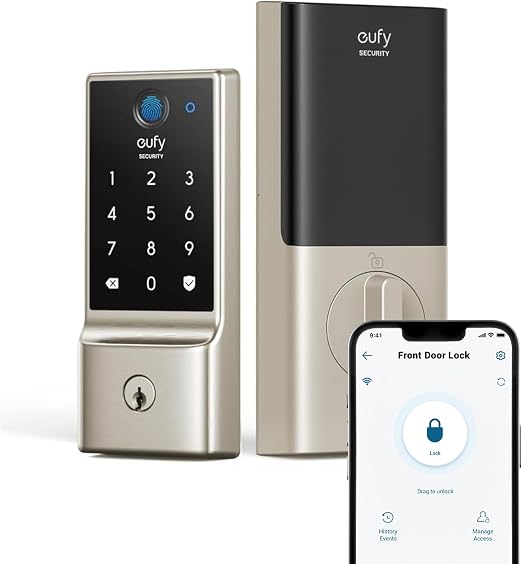
The C220's fingerprint reader is the self-learning kind that improves as it studies your prints, and because Wi-Fi is built in rather than bridged, fingerprint entry and remote app control arrive in one mid-priced lock.
Strengths
- Self-learning AI fingerprint reader improves recognition as it learns your prints
- Six ways in: fingerprint, app, keypad code, physical key, Apple Watch, and voice assistant
- Built-in Wi-Fi connects directly, no bridge or hub to buy
- Runs about 8 months on 8 AA batteries, with IP53 weather resistance
Limitations
- BHMA Grade 3, below the Grade 2 and AAA locks in this guide
- No Apple Home Key support
- Eight AA batteries is a lot of cells to replace at once
| Model | T8506 (Nickel) |
|---|---|
| Unlock methods | Fingerprint, app, keypad, key, watch, voice |
| Connectivity | Built-in Wi-Fi, no bridge |
| Battery | 8 AA, about 8 months |
| Ratings | IP53, BHMA Grade 3 |
Sources: CamelCamelCamel, Desertcart product details, eufy product documentation
Best for: Households that want fast fingerprint entry without buying a separate Wi-Fi bridge.
Skip if: You need Apple Home Key or a higher BHMA grade; this lock is Grade 3 and skips Home Key.
Questions, answered
How fast is fingerprint unlock really?
Top models unlock in about a second from touch to bolt retraction. That matches or beats fumbling for a key, and it works with arms full of groceries, which is the real-world win.
Do fingerprints work for kids and elderly users?
Sometimes inconsistently. Small or worn fingerprints read less reliably, which is why every fingerprint lock needs a keypad or key backup. Test all household members during the return window.
Are my fingerprints stored securely?
Consumer locks store fingerprint templates locally on the lock, not in the cloud. Templates are mathematical representations, not images, and cannot be reverse-engineered into a usable print.
What if my finger is wet or injured?
Wet fingers read poorly on capacitive sensors. Use the keypad code or app as backup, or enroll the same finger twice, once dry and once slightly damp, to improve match rates.