Best of
The Best Smart Locks (2027)
The best smart locks for 2027, ranked on security grade, unlock methods, battery behavior, and ecosystem fit. Schlage, Yale, August, and Kwikset picks.
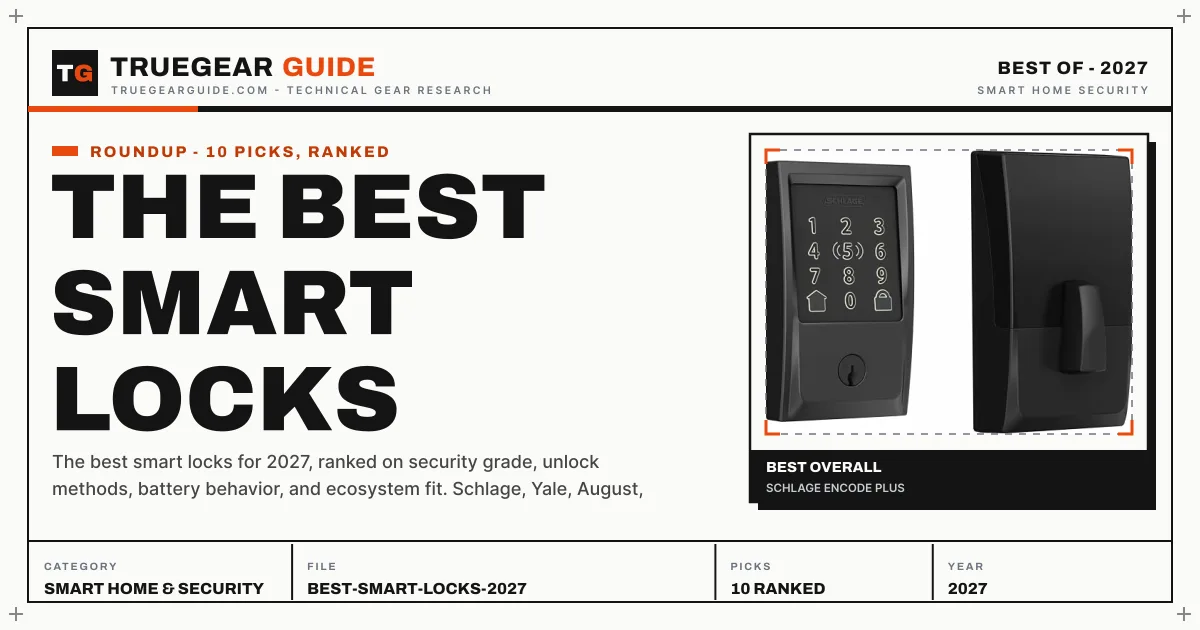
The short answer
The Schlage Encode Plus is the best smart lock for most people in 2027: Grade 1 security, built-in WiFi, and Apple HomeKey. For fingerprint entry, get the Kwikset Halo Touch. Renters who cannot change the deadbolt should get the retrofit August Wi-Fi Smart Lock.
Our top picks at a glance
- Schlage Encode PlusApple HomeKey plus WiFi, in a Grade 1 deadbolt.Best overall
- Kwikset Halo TouchFingerprint unlock with WiFi, at a mid-range price.Best fingerprint lock
- Yale Assure Lock 2The flexible keypad lock that fits every smart home.Most flexible
- August Wi-Fi Smart Lock (4th Gen)Keep your key and deadbolt; add brains inside.Best retrofit
- Ultraloq U-Bolt Pro WiFiSix ways in, including a fast fingerprint reader, at a mid-range price.Best fingerprint value
What owners report
Synthesized from recurring themes in long-term owner feedback.
Most praised
- Giving cleaners, walkers, and family their own codes ends the hidden spare key habit for good
- Auto lock paired with a door closed sensor removes the nightly did I lock it check
- Fingerprint and tap to unlock feel faster than keys when hands are full of bags or a child
- Entry history in the app settles arguments about when a door was opened and by which code
- Renters value retrofit designs that add smart control without changing what a landlord sees outside
Common complaints
- Battery warnings feel easy to ignore until a lock is sluggish on a cold night with shopping in hand
- Auto unlock based on phone location occasionally fires late or while the owner is still just outside
- Doors that are slightly out of alignment cause bolt friction that no app setting can fix
- Touchscreens can be hard to read in bright sun and less responsive with wet or gloved hands
- Remote features often depend on a hub, bridge, or module that was not obvious in the headline price
The picks, ranked
| # | Product | Award | Security grade | Unlock methods | Connectivity | Access codes | Battery |
|---|---|---|---|---|---|---|---|
| 1 | Schlage Encode Plus | Best overall | ANSI/BHMA Grade 1 | Apple HomeKey, keypad, key, app | Built-in WiFi, Bluetooth | Up to 100 | 2x AA (keypad model) |
| 2 | Kwikset Halo Touch | Best fingerprint lock | ANSI/BHMA Grade 2 | Fingerprint, keypad, key, app | Built-in WiFi | - | - |
| 3 | Yale Assure Lock 2 | Most flexible | ANSI/BHMA Grade 2 | Keypad, key, app | Bluetooth; WiFi via module | Up to 250 | - |
| 4 | August Wi-Fi Smart Lock (4th Gen) | Best retrofit | - | App, auto-unlock, key (existing) | Built-in WiFi, Bluetooth | - | 2x CR123A |
| 5 | Ultraloq U-Bolt Pro WiFi | Best fingerprint value | - | - | - | - | - |
| 6 | Lockly Secure Plus | Best anti-peek keypad | - | - | - | - | - |
| 7 | SwitchBot Lock Pro | Best for renters | - | - | - | - | - |
| 8 | Aqara Smart Lock U200 | Best Matter retrofit | - | - | - | - | - |
| 9 | Aqara Smart Lock U50 | Best for Apple HomeKit | - | - | - | - | - |
| 10 | Yale Assure Lock SL | Best key-free design | - | - | - | - | - |
Best overall
Schlage Encode Plus
Apple HomeKey plus WiFi, in a Grade 1 deadbolt.

The Encode Plus is the only mainstream lock combining ANSI Grade 1 security, built-in WiFi, and Apple HomeKey tap-to-unlock. HomeKey is the standout: holding an iPhone or Apple Watch near the lock opens it even when the phone battery is dead. With up to 100 access codes and no hub required, it is the complete package for Apple households and the best-built lock in this guide.
Strengths
- Apple HomeKey: tap iPhone or Apple Watch to unlock, even with a dead phone battery
- Built-in WiFi for remote access with no separate hub or bridge
- ANSI Grade 1 certified, the highest residential security rating
- Fingerprint-resistant touchscreen keypad with up to 100 access codes
Limitations
- No fingerprint reader; keypad codes or phone are the keyless methods
- HomeKey is Apple-only, Android users lose the headline feature
- Premium price for the hardware
| Security grade | ANSI/BHMA Grade 1 |
|---|---|
| Unlock methods | Apple HomeKey, keypad, key, app |
| Connectivity | Built-in WiFi, Bluetooth |
| Access codes | Up to 100 |
| Battery | 2x AA (keypad model) |
Best for: iPhone households that want tap-to-unlock and top-tier build quality.
Skip if: You are on Android or want fingerprint unlock.
Best fingerprint lock
Kwikset Halo Touch
Fingerprint unlock with WiFi, at a mid-range price.

Fingerprint unlock is the fastest keyless method, and the Halo Touch does it for a mid-range price with up to 100 stored prints. Built-in WiFi means remote access with no bridge, and SmartKey lets you re-key the cylinder yourself in seconds, a genuinely useful feature when keys change hands. It is the family pick: kids without phones still get in with a finger.
Strengths
- Fingerprint reader stores up to 100 prints and unlocks in about a second
- Built-in WiFi for remote lock, unlock, and notifications
- SmartKey Security allows re-keying the cylinder yourself in seconds
- Contemporary touchscreen keypad as backup entry
Limitations
- ANSI Grade 2 rather than Grade 1
- No Apple HomeKey support
- Fingerprint can struggle with very wet fingers
| Security grade | ANSI/BHMA Grade 2 |
|---|---|
| Unlock methods | Fingerprint, keypad, key, app |
| Fingerprint capacity | Up to 100 prints |
| Connectivity | Built-in WiFi |
| Re-keying | SmartKey Security cylinder |
Best for: Families who want one-touch fingerprint entry without phone dependence.
Skip if: You need Apple HomeKey or the highest security grade.
Most flexible
Yale Assure Lock 2
The flexible keypad lock that fits every smart home.

The Assure Lock 2 modular radio system is unique: choose WiFi, Z-Wave, or Zigbee to match your hub instead of accepting the lock WiFi default. DoorSense auto-lock only engages when the door is actually closed, which prevents the classic smart lock failure of locking an open door. Up to 250 access codes suit rentals and small offices.
Strengths
- Modular radio design: WiFi, Z-Wave, or Zigbee modules for any hub
- Auto-lock with DoorSense confirms the door is actually closed
- Slim, modern keypad design that suits contemporary doors
- Yale Access app with temporary guest codes and entry history
Limitations
- WiFi module is a separate purchase on base models
- No biometric unlock option
- ANSI Grade 2, a step below Grade 1 deadbolts
| Security grade | ANSI/BHMA Grade 2 |
|---|---|
| Unlock methods | Keypad, key, app |
| Connectivity | Bluetooth; WiFi via module |
| Access codes | Up to 250 |
| Auto-lock | Yes, with DoorSense |
Best for: Households that want keypad entry with a choice of WiFi, Z-Wave, or Zigbee.
Skip if: You want fingerprint unlock or Apple HomeKey.
Best retrofit
August Wi-Fi Smart Lock (4th Gen)
Keep your key and deadbolt; add brains inside.

The August 4th Gen is the renter pick because it changes nothing outside: your key still works, the landlord sees the same deadbolt, and all the intelligence lives on the interior side. Built-in WiFi removes the old August bridge requirement, and DoorSense plus auto-unlock make it feel invisible in daily use. Add the separate keypad if guests need code entry.
Strengths
- Retrofit design keeps your existing key, deadbolt, and exterior hardware
- Built-in WiFi with no bridge required for remote access
- DoorSense tells you if the door is open, closed, or ajar
- Auto-lock and auto-unlock based on phone proximity
Limitations
- No built-in keypad; the keypad is a separate accessory
- Interior-only unit means no exterior upgrade in looks or weather sealing
- Auto-unlock can trigger while you are still nearby but outside
| Design | Retrofit, interior mount |
|---|---|
| Unlock methods | App, auto-unlock, key (existing) |
| Connectivity | Built-in WiFi, Bluetooth |
| Door sensor | DoorSense open/closed detection |
| Battery | 2x CR123A |
Best for: Renters and anyone who cannot replace the exterior deadbolt.
Skip if: You want a keypad on the door itself.
Best fingerprint value
Ultraloq U-Bolt Pro WiFi
Six ways in, including a fast fingerprint reader, at a mid-range price.

The U-Bolt Pro WiFi puts a sub-second fingerprint reader on your door for mid-range money, plus five other entry methods as backup. Built-in WiFi means no bridge dongle, and the IP65 rating handles real weather. It lacks Apple HomeKey, but for fingerprint-first households it is the value king.
Strengths
- Fingerprint reader unlocks in under a second
- Six entry methods: fingerprint, code, key, app, auto-unlock, shake-to-open
- Built-in WiFi, no separate bridge needed
- IP65 rated for exterior exposure
Limitations
- No Apple HomeKey support
- Auto-unlock relies on phone geofencing which can be finicky
- Bulkier interior assembly than Yale or Schlage
| Entry methods | 6 (fingerprint, code, key, app, auto-unlock, shake) |
|---|---|
| Built-in WiFi | Yes, no bridge required |
| Weather rating | IP65 |
| Keypad | Anti-peep touchscreen |
| Power | 4 AA batteries |
Best for: Households that want fingerprint unlock without flagship pricing.
Skip if: You need Apple HomeKey; this lock does not support it.
Best anti-peek keypad
Lockly Secure Plus
A scrambling PIN pad that defeats shoulder-surfing.

Lockly's PIN Genie scrambles the keypad digits after every use, so nobody can learn your code by watching or by reading smudges. Offline access codes keep working without internet, which matters during outages. It is premium-priced, but no other keypad takes shoulder-surfing this seriously.
Strengths
- PIN Genie keypad scrambles digits after every use
- Offline access codes work without internet
- Auto-lock with adjustable timing
- Works with Alexa and Google Assistant
Limitations
- No built-in WiFi on the base model; needs the WiFi hub for remote access
- Premium price for a keypad lock
- App is less polished than Yale or Schlage
| Keypad | PIN Genie scrambling touchscreen |
|---|---|
| Entry methods | Code, key, app, offline codes |
| Auto-lock | Yes, adjustable |
| Power | 4 AA batteries |
| Smart home | Alexa, Google (via WiFi hub) |
Best for: Security-conscious buyers who enter codes where others can watch.
Skip if: You want fingerprint unlock; this model is keypad-first.
Best for renters
SwitchBot Lock Pro
A retrofit lock that keeps your existing deadbolt and keys.

The Lock Pro is the only pick that leaves your deadbolt completely intact: it clamps over the existing thumbturn, so landlords have nothing to object to. Remove it at move-out and the original lock is untouched. Add the keypad or fingerprint pad for full keyless entry, with Matter support through the SwitchBot hub.
Strengths
- Installs over the existing deadbolt, no lock replacement
- Landlord-friendly: remove it and the original lock is untouched
- Keypad and fingerprint accessories available
- Matter support via SwitchBot hub
Limitations
- Bulky add-on unit on the inside of the door
- Needs a SwitchBot hub for remote access and Matter
- Battery life shorter than built-in deadbolt replacements
| Install type | Retrofit over existing deadbolt |
|---|---|
| Entry methods | App, keypad add-on, fingerprint add-on, original key |
| Smart home | Matter (via hub), Alexa, Google |
| Power | Rechargeable battery |
| Auto-lock | Yes |
Best for: Renters who cannot replace the deadbolt.
Skip if: You want a clean built-in look; this mounts over your existing lock.
Best Matter retrofit
Aqara Smart Lock U200
Retrofit Matter lock with Apple HomeKey support.

The U200 brings Apple HomeKey to a retrofit form factor: tap your iPhone or Apple Watch to unlock, with Matter-over-Thread keeping everything local and fast. It preserves your existing exterior cylinder, so the door looks unchanged from outside. You will need a Thread border router, but for Apple homes this is the retrofit to beat.
Strengths
- Apple HomeKey: unlock with iPhone or Apple Watch
- Matter-over-Thread for local smart home control
- Retrofit design keeps the existing exterior cylinder
- Keypad accessory for code entry
Limitations
- Needs a Thread border router for Matter features
- Adapter fit varies by deadbolt brand
- Aqara app setup has more steps than August
| Install type | Retrofit over existing deadbolt |
|---|---|
| Smart home | Matter-over-Thread, Apple Home |
| Entry methods | HomeKey, app, keypad add-on, original key |
| Power | Rechargeable battery |
| Auto-lock | Yes |
Best for: Apple households that need a retrofit lock with HomeKey.
Skip if: Your door uses a non-standard deadbolt the adapter cannot fit.
Best for Apple HomeKit
Aqara Smart Lock U50
The Home Key deadbolt with keypad entry and a rekeyable cylinder.

The U50 is the Home Key deadbolt: tap an iPhone or Apple Watch to unlock, manage guest access in Apple Home, and use keypad codes for everyone else. It needs an Aqara hub for remote and Matter features, but in an Apple household it integrates deeper than anything else at its tier.
Strengths
- Apple Home Key tap-to-unlock with iPhone or Apple Watch, including power reserve
- Keypad codes including one-time and periodic passwords
- Rekeyable cylinder can match an existing 5-pin key
- Auto-lock with built-in gyroscope door sensing
Limitations
- No fingerprint reader
- Remote access and Matter features need an Aqara hub
- NFC card for tap entry is sold separately
| Smart home | Apple HomeKit and Home Key; Matter, Alexa, and Google with an Aqara hub |
|---|---|
| Keypad | Touch keypad with PIN codes |
| Entry methods | Home Key, code, key, app, NFC card (sold separately) |
| Power | 4 AA batteries, USB-C emergency power |
| Auto-lock | Yes, with built-in gyroscope |
Best for: Apple Home households that want Home Key tap-to-unlock without flagship pricing.
Skip if: You want a fingerprint reader; the U50 has none, so choose a fingerprint model instead.
Best key-free design
Yale Assure Lock SL
Key-free touchscreen deadbolt with a slim profile.

The Assure Lock SL commits fully to keyless living with no keyway at all, in Yale's slimmest touchscreen package. Guest codes, schedules, and auto-unlock cover every access pattern, and the module slot accepts WiFi, Z-Wave, or Zigbee. Just understand the trade: with no physical key, dead batteries mean the 9V backup terminals, so keep them in mind.
Strengths
- No keyway at all: fully key-free design
- Slim touchscreen looks clean on the door
- Yale Access app with guest codes and schedules
- Works with Yale WiFi bridge or Z-Wave and Zigbee modules
Limitations
- No physical key override if electronics fail
- WiFi requires the separate Yale bridge or module
- Touchscreen can be hard to read in direct sun
| Keyway | None, fully keyless |
|---|---|
| Keypad | Capacitive touchscreen |
| Entry methods | Code, app, auto-unlock |
| Power | 4 AA batteries |
| Smart modules | WiFi, Z-Wave, or Zigbee |
Best for: Buyers who want a completely keyless front door.
Skip if: You want a physical key backup; this model has no keyway.
How we chose
We ranked locks on five factors. Security grade: ANSI/BHMA Grade 1 outranks Grade 2; it measures resistance to forced entry, not electronics. Unlock methods: more independent methods (fingerprint, code, phone, key) means fewer lockouts. Battery behavior: low-battery warnings must be loud and early, and a 9V jump-start terminal or key override must exist. Auto-lock reliability: door-position sensing beats timer-only locking. Ecosystem fit: the lock must speak your platform, HomeKit, Google Home, or Alexa, natively.
Questions, answered
Are smart locks actually secure?
A Grade 1 or Grade 2 smart lock with a properly installed deadbolt is as secure or more secure than a standard keyed deadbolt. The electronics add attack surface in theory, but real-world break-ins target doors and frames, not lock firmware. Choose ANSI-graded hardware and a long strike-plate installation.
What happens when the battery dies?
Every lock here warns well before death with app alerts, audible beeps, and flashing LEDs. If you ignore them, most offer a 9V battery jump-start on exterior models or a physical key override. Retrofit and keypad models keep key access regardless.
Can smart locks be hacked?
Published research shows most attacks target weak app passwords and unsecured WiFi, not the lock radio. Use a unique strong password, enable two-factor authentication on the lock app, and keep firmware updated. Bluetooth and Z-Wave exploits exist in labs but are rare in real burglaries.
Do I need a hub?
Not with these picks: all four have built-in WiFi or Bluetooth for direct control. Hubs only matter if you want Z-Wave or Zigbee integration with a system like SmartThings or Hubitat, where the Yale Assure Lock 2 modular design shines.