For dye-sub printing
The Best Dye Sublimation Photo Printers (2027)
The best dye sublimation photo printers for 2027: true dye-sub 4x6 and pocket printers compared on overcoat durability, media cost and connectivity.
The short answer
For dye sublimation printing in 2027, buy the Canon SELPHY CP1500 for 4x6 prints. For pocket prints with dye-sub quality, buy the Polaroid Hi-Print.
Our top picks at a glance
- Canon SELPHY CP1500The dye-sub benchmark: borderless 4x6 lab prints with a protective coat.Best overall
- Liene 4x6 Photo PrinterA Wi-Fi dye-sub 4x6 printer that bundles generous starter media.Best value
- Polaroid Hi-Print 2x3 Pocket PrinterA pocket dye-sub sticker printer for 2x3 prints from your phone.Best pocket dye-sub
- Kodak Dock Plus Instant Photo PrinterA docking 4PASS 4x6 printer that charges your phone while it prints.Best home dock printer
- HP Sprocket Studio PlusHP's dye-sub 4x6 printer with Wi-Fi and a deep app editing suite.Best app experience
- HPRT CP4100 Portable Photo PrinterA compact dye-sub 4x6 printer with battery power for events and travel.Best portable dye-sub
- Canon SELPHY Square QX10Square dye-sub sticker prints with a protective coat, from a pocketable Canon.Best square dye-sub
- Kodak Mini 2 RetroRetro-styled 4PASS dye-sub pocket printer with laminated 2.1 x 3.4 prints.Best wallet-size dye-sub
What owners report
Synthesized from recurring themes in long-term owner feedback.
Most praised
- Dry, coated prints can be handled, stacked and handed over straight away without smudge worries
- Colour gradients on faces and skies look smoother than pocket thermal prints at the same size
Common complaints
- Matched ribbon and paper packs run out together, so a party can stop mid flow if no spare pack is on hand
- Owners wanting larger than postcard output hit a hard ceiling with this whole format
The picks, ranked
Every product in this lineup was picked for this use case, ranked with our strongest choices first. If a product from the wider category does not genuinely fit this scenario, it is not listed here.
| # | Product | Award | Technology | Max print size | Speed | Connectivity | Size / weight |
|---|---|---|---|---|---|---|---|
| 1 | Canon SELPHY CP1500 | Best overall | Dye-sublimation thermal transfer, 300 x 300 dpi, 256 levels per colour | Postcard 100 x 148 mm (4x6), plus card and sticker sizes | Approx. 41 sec per postcard print | Wi-Fi, AirPrint, USB, SD card slot, SELPHY Photo Layout app | 182 x 133 x 58 mm, approx. 850 g |
| 2 | Liene 4x6 Photo Printer | Best value | Dye-sublimation thermal transfer | - | - | Wi-Fi hotspot and home Wi-Fi via Liene app, AirPrint on select models | - |
| 3 | Polaroid Hi-Print 2x3 Pocket Printer | Best pocket dye-sub | Dye-sublimation pocket printer | - | - | Bluetooth via Polaroid Hi-Print app | - |
| 4 | Kodak Dock Plus Instant Photo Printer | Best home dock printer | 4PASS dye sublimation, laminated finish | - | - | Phone dock (Lightning and USB-C pins), Bluetooth app | - |
| 5 | HP Sprocket Studio Plus | Best app experience | Dye-sublimation | - | - | Wi-Fi and Bluetooth via HP Sprocket app | - |
| 6 | HPRT CP4100 Portable Photo Printer | Best portable dye-sub | Dye-sublimation, 300 x 300 dpi class | - | - | Wi-Fi via companion app, USB on select bundles | - |
| 7 | Canon SELPHY Square QX10 | Best square dye-sub | Dye-sublimation thermal transfer | - | Approx. 43 sec per print | - | 102 x 143 x 31 mm, approx. 445 g |
| 8 | Kodak Mini 2 Retro | Best wallet-size dye-sub | 4PASS dye-sublimation with lamination | - | - | Bluetooth via Kodak Photo Printer app | - |
Best overall
Canon SELPHY CP1500
The dye-sub benchmark: borderless 4x6 lab prints with a protective coat.

The dye-sub benchmark: continuous-tone colour, a protective overcoat, and printing from phone, SD card or computer. If the phrase dye sub photo printer means one machine for most buyers, it is this one.
Strengths
- Dye-sublimation prints are water-resistant and rated for long album life
- Wi-Fi, AirPrint, USB and SD card printing cover every source
- SELPHY app adds layouts, collages and QR-code prints
- Optional battery pack makes it a genuinely portable party printer
Limitations
- Maximum print is postcard 4x6 plus smaller sticker and square formats
- Print speed is about 41 seconds per 4x6, steady, not instant
- Paper and ink come in matched packs, so partial-pack waste is possible
| Technology | Dye-sublimation thermal transfer, 300 x 300 dpi, 256 levels per colour |
|---|---|
| Max print size | Postcard 100 x 148 mm (4x6), plus card and sticker sizes |
| Speed | Approx. 41 sec per postcard print |
| Connectivity | Wi-Fi, AirPrint, USB, SD card slot, SELPHY Photo Layout app |
| Size / weight | 182 x 133 x 58 mm, approx. 850 g |
Best for: Families and phone shooters who want durable 4x6 prints at a known cost.
Skip if: You want prints larger than 4x6; this is a dedicated small-format printer.
Best value
Liene 4x6 Photo Printer
A Wi-Fi dye-sub 4x6 printer that bundles generous starter media.

Proper laminated dye-sub 4x6 output with generous bundled media and a built-in Wi-Fi hotspot, at a starter cost below the Canon.
Strengths
- Dye-sublimation 4x6 prints with laminated protection
- Built-in Wi-Fi hotspot connects multiple phones without a router
- Bundles often include 100-plus sheets and multiple cartridges
- Competitive cost per print in bundle pricing
Limitations
- App and firmware polish trail Canon and HP
- No battery option for true portability
- Long-term media availability depends on a smaller brand
| Technology | Dye-sublimation thermal transfer |
|---|---|
| Print size | 4x6 in borderless |
| Connectivity | Wi-Fi hotspot and home Wi-Fi via Liene app, AirPrint on select models |
| Media | Liene cartridges and paper, 20 prints per cartridge |
| Power | AC adapter |
Best for: Budget home printers who want SELPHY-style output and multi-device Wi-Fi.
Skip if: You need SD card and USB host printing without a phone in the loop.
Best pocket dye-sub
Polaroid Hi-Print 2x3 Pocket Printer
A pocket dye-sub sticker printer for 2x3 prints from your phone.
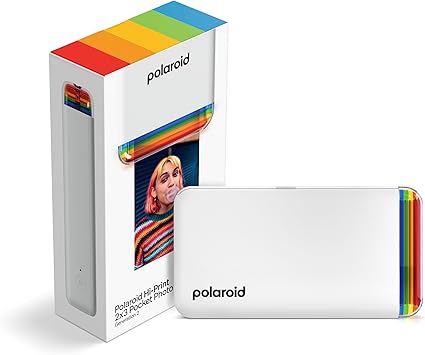
Dye-sublimation in a pocket 2x3 sticker format. Proof that dye-sub quality is not limited to desktop machines, with saturation ZINK rivals cannot match.
Strengths
- Dye-sub colour beats ZINK pocket printers on saturation and detail
- Self-adhesive print backs for journals, planners and cases
- Credit-card-sized body with USB rechargeable battery
- Polaroid Hi-Print app adds frames and editing
Limitations
- 2x3 inch prints only, too small for framing ambitions
- Cartridge cost per print exceeds ZINK paper
- Bluetooth-only workflow, no PC printing
| Technology | Dye-sublimation pocket printer |
|---|---|
| Print size | 2.1 x 3.4 in (2x3 class), adhesive back |
| Connectivity | Bluetooth via Polaroid Hi-Print app |
| Cartridges | Hi-Print all-in-one cartridges, 20 prints each |
| Battery | USB rechargeable, approx. 20 prints per charge class |
Best for: Journalling and sticker-print fans who want dye-sub quality in pocket size.
Skip if: You want 4x6 album prints; Hi-Print is a 2x3 format only.
Best home dock printer
Kodak Dock Plus Instant Photo Printer
A docking 4PASS 4x6 printer that charges your phone while it prints.

Kodak's 4PASS process is dye-sub with a laminating final pass, so Dock Plus prints shrug off water and fingerprints, and the dock charges the phone while the print develops.
Strengths
- 4PASS laminated prints resist water, fingerprints and fading
- Docks and charges the phone while printing via its connector
- Bluetooth printing for phones that are not docked
- Cartridge bundles paper and colour for predictable cost per print
Limitations
- Dock connector fit varies with phone cases and models
- Slower than inkjet first-page times for single prints
- Cartridge ecosystem is Kodak-specific
| Technology | 4PASS dye sublimation, laminated finish |
|---|---|
| Print size | 4x6 in borderless or bordered |
| Connectivity | Phone dock (Lightning and USB-C pins), Bluetooth app |
| Cartridges | PHC series all-in-one cartridges, 40 or 80 print bundles |
| Extras | Simultaneous phone charging while docked |
Best for: Home users who want laminated 4x6 prints and a phone dock in one device.
Skip if: You need battery portability; the Dock Plus is a home-base printer.
Best app experience
HP Sprocket Studio Plus
HP's dye-sub 4x6 printer with Wi-Fi and a deep app editing suite.

The Studio Plus is dye-sub done socially: 4x6 prints with the technology's known durability, driven by an app whose templates make multi-photo layouts painless.
Strengths
- Dye-sub 4x6 prints with the durability the technology is known for
- HP Sprocket app offers strong templates, collages and editing
- Wi-Fi connectivity for shared household printing
- Optional battery accessory extends it to events
Limitations
- App account and ecosystem dependence for full features
- Paper and cartridge costs track rivals rather than undercutting them
- Larger footprint than SELPHY-class rivals
| Technology | Dye-sublimation |
|---|---|
| Print size | 4x6 in |
| Connectivity | Wi-Fi and Bluetooth via HP Sprocket app |
| In-box media | Starter cartridges and paper pack included (bundle varies) |
| Power | AC adapter, optional battery accessory |
Best for: Phone-first families who live in an app workflow and print 4x6 socially.
Skip if: You want the smallest travel printer; Studio Plus is a home printer with an optional battery.
Best portable dye-sub
HPRT CP4100 Portable Photo Printer
A compact dye-sub 4x6 printer with battery power for events and travel.

HPRT matches the SELPHY formula at 300 dpi class with a protective overcoat, in a smaller body with battery-equipped variants for printing away from a wall socket.
Strengths
- Dye-sublimation 4x6 prints with protective overcoat
- Built-in battery option for location printing without mains power
- Wi-Fi app printing from phones and tablets
- Compact body travels better than most home dye-sub units
Limitations
- Consumable availability is thinner than Canon KP-series media
- App experience is functional rather than refined
- Smaller brand support network in the US
| Technology | Dye-sublimation, 300 x 300 dpi class |
|---|---|
| Print size | 4x6 in (100 x 148 mm) |
| Connectivity | Wi-Fi via companion app, USB on select bundles |
| Power | AC adapter with battery-equipped variants |
| Media | HPRT ribbon and paper packs |
Best for: Event and travel shooters who want SELPHY-style prints in a smaller kit.
Skip if: You want Canon's app polish and media availability everywhere.
Best square dye-sub
Canon SELPHY Square QX10
Square dye-sub sticker prints with a protective coat, from a pocketable Canon.

The QX10 shows dye-sub's gradient advantage at pocket size: 256 shades per colour on square sticker prints, sealed with the overcoat inkjet and ZINK minis do not offer.
Strengths
- Dye-sublimation output with 256 shades per colour beats ZINK on gradients
- Square 68 x 68 mm prints on sticker paper with a protective overcoat
- Built-in battery prints about 20 sheets per charge for parties and trips
- SELPHY Photo Layout app adds borders, stamps and QR codes
Limitations
- One print format only, square on 72 x 85 mm paper
- About 43 seconds per print is deliberate, not instant
- XS-20L paper and ink bundles are the only media option
| Technology | Dye-sublimation thermal transfer |
|---|---|
| Print size | 68 x 68 mm image on 72 x 85 mm sticker paper |
| Resolution | 287 x 287 dpi class, 256 shades per colour |
| Speed | Approx. 43 sec per print |
| Battery | Built-in, approx. 20 prints per charge |
| Size / weight | 102 x 143 x 31 mm, approx. 445 g |
Sources: Amazon, Desertcart, Ubuy, CamelCamelCamel
Best for: Journal and scrapbook makers who want square dye-sub prints that stick.
Skip if: You need standard 4x6 prints; the QX10 prints one square format only.
Best wallet-size dye-sub
Kodak Mini 2 Retro
Retro-styled 4PASS dye-sub pocket printer with laminated 2.1 x 3.4 prints.

The Mini 2 Retro's fourth pass is a laminate layer, which is dye-sub's durability argument in miniature: wallet prints that resist water, fingerprints, and pocket wear.
Strengths
- 4PASS dye-sublimation lays down a laminating layer that resists water and fingerprints
- Bluetooth printing from the Kodak app on iOS and Android
- Credit-card class 2.1 x 3.4 in prints suit wallets and phone cases
- USB-C charging matches modern phone cables
Limitations
- Prints are small; fine detail softens at this size
- Cartridge and paper are one combined consumable to keep buying
- No sticker-back paper option like some rivals offer
| Technology | 4PASS dye-sublimation with lamination |
|---|---|
| Print size | 2.1 x 3.4 in |
| Connectivity | Bluetooth via Kodak Photo Printer app |
| Charging | USB-C |
| Bundle | P210R white, 38-sheet starter bundle |
| Finish | Water and fingerprint resistant laminate |
Sources: Amazon, Desertcart, CamelCamelCamel
Best for: Wallet-print fans who want dye-sub colour and lamination in a pocket printer.
Skip if: You want prints larger than wallet size or instant film character.
Questions, answered
How does dye sublimation printing work?
Heat transfers cyan, magenta and yellow dyes from a ribbon onto the paper in separate passes, then a clear overcoat seals the print. Because dye blends in continuous tone, there is no visible dot pattern, and the overcoat resists water and fingerprints.
Dye-sub or inkjet for photos?
Dye-sub for 4x6 and smaller: fixed cost per print, no maintenance, laminated durability. Inkjet for larger sizes, fine-art papers and the lowest ink cost at volume via tank systems.
How long do dye-sub prints last?
With the overcoat and album storage away from sunlight, dye-sub prints carry multi-decade longevity claims from makers. They also survive handling, spills and fridge-door life better than uncoated output.
Why do dye-sub packs include ink and paper together?
The ribbon is consumed in exact proportion to the paper, one set of dye panels per print. Bundling them means a pack never leaves you with paper and no ink, and cost per print is simple division.